
Introduction
The first mobile challenge of the Jeanne DHACK CTF 2026 is here! The challenge provides an APK file of a mobile game called Mobile Odyssey, and the goal is to find secret information hidden within the app. Easy, right?
This challenge is not particularly hard if you have experience with mobile app reverse engineering and the right tools. This is my first time using certain tools. Not having a rooted phone makes dynamic reverse engineering challenging.
I spent much more time setting up the environment than solving the challenge, but I finally got the flag.
I used Waydroid for emulation and ADB, as well as Frida. For reverse static analysis, I used JADX and JADX-GUI, plus some other tools like apktool and uber-apk-signer.
Okay, let’s start.
Source
All the main logic is here
package com.jeannedhackctf.mobileodyssey;
import android.os.Bundle;import android.util.Base64;import android.widget.TextView;import androidx.appcompat.app.AppCompatActivity;import androidx.constraintlayout.widget.ConstraintLayout;import com.google.android.gms.tasks.OnCompleteListener;import com.google.android.gms.tasks.Task;import com.google.firebase.ktx.Firebase;import com.google.firebase.remoteconfig.FirebaseRemoteConfig;import com.google.firebase.remoteconfig.FirebaseRemoteConfigSettings;import com.google.firebase.remoteconfig.ktx.RemoteConfigKt;import java.util.Map;import kotlin.Metadata;import kotlin.TuplesKt;import kotlin.Unit;import kotlin.collections.MapsKt;import kotlin.jvm.functions.Function1;import kotlin.jvm.internal.Intrinsics;import kotlin.text.Charsets;import kotlin.text.StringsKt;
/* compiled from: MainActivity.kt */@Metadata(d1 = {"\u0000.\n\u0002\u0018\u0002\n\u0002\u0018\u0002\n\u0002\b\u0003\n\u0002\u0018\u0002\n\u0000\n\u0002\u0018\u0002\n\u0000\n\u0002\u0010\u000e\n\u0002\b\u0002\n\u0002\u0010\u0002\n\u0000\n\u0002\u0018\u0002\n\u0002\b\u0004\u0018\u00002\u00020\u0001B\u0007¢\u0006\u0004\b\u0002\u0010\u0003J\u0012\u0010\u000b\u001a\u00020\f2\b\u0010\r\u001a\u0004\u0018\u00010\u000eH\u0014J\b\u0010\u000f\u001a\u00020\fH\u0002J\u0012\u0010\u0010\u001a\u0004\u0018\u00010\t2\u0006\u0010\u0011\u001a\u00020\tH\u0002R\u000e\u0010\u0004\u001a\u00020\u0005X\u0082.¢\u0006\u0002\n\u0000R\u000e\u0010\u0006\u001a\u00020\u0007X\u0082.¢\u0006\u0002\n\u0000R\u0010\u0010\b\u001a\u0004\u0018\u00010\tX\u0082\u000e¢\u0006\u0002\n\u0000R\u000e\u0010\n\u001a\u00020\tX\u0082D¢\u0006\u0002\n\u0000¨\u0006\u0012"}, d2 = {"Lcom/jeannedhackctf/mobileodyssey/GameActivity;", "Landroidx/appcompat/app/AppCompatActivity;", "<init>", "()V", "remoteConfig", "Lcom/google/firebase/remoteconfig/FirebaseRemoteConfig;", "statusTextView", "Landroid/widget/TextView;", "retrievedFlag", "", "REMOTE_KEY", "onCreate", "", "savedInstanceState", "Landroid/os/Bundle;", "fetchRemoteConfig", "tryDecodeBase64", "value", "app_debug"}, k = 1, mv = {2, 0, 0}, xi = ConstraintLayout.LayoutParams.Table.LAYOUT_CONSTRAINT_VERTICAL_CHAINSTYLE)/* loaded from: classes3.dex */public final class GameActivity extends AppCompatActivity { private final String REMOTE_KEY = "sEcre7vALu3"; private FirebaseRemoteConfig remoteConfig; private String retrievedFlag; private TextView statusTextView;
@Override // androidx.fragment.app.FragmentActivity, androidx.activity.ComponentActivity, androidx.core.app.ComponentActivity, android.app.Activity protected void onCreate(Bundle savedInstanceState) { super.onCreate(savedInstanceState); setContentView(R.layout.activity_game); this.statusTextView = (TextView) findViewById(R.id.tv_status); TextView textView = this.statusTextView; FirebaseRemoteConfig firebaseRemoteConfig = null; if (textView == null) { Intrinsics.throwUninitializedPropertyAccessException("statusTextView"); textView = null; } textView.setText("🔧 En construction\nReviens bientôt pour plus de contenu."); this.remoteConfig = RemoteConfigKt.getRemoteConfig(Firebase.INSTANCE); FirebaseRemoteConfigSettings configSettings = RemoteConfigKt.remoteConfigSettings(new Function1() { // from class: com.jeannedhackctf.mobileodyssey.GameActivity$$ExternalSyntheticLambda2 @Override // kotlin.jvm.functions.Function1 public final Object invoke(Object obj) { return GameActivity.onCreate$lambda$0((FirebaseRemoteConfigSettings.Builder) obj); } }); FirebaseRemoteConfig firebaseRemoteConfig2 = this.remoteConfig; if (firebaseRemoteConfig2 == null) { Intrinsics.throwUninitializedPropertyAccessException("remoteConfig"); firebaseRemoteConfig2 = null; } firebaseRemoteConfig2.setConfigSettingsAsync(configSettings); Map defaults = MapsKt.mapOf(TuplesKt.to(this.REMOTE_KEY, "")); FirebaseRemoteConfig firebaseRemoteConfig3 = this.remoteConfig; if (firebaseRemoteConfig3 == null) { Intrinsics.throwUninitializedPropertyAccessException("remoteConfig"); } else { firebaseRemoteConfig = firebaseRemoteConfig3; } firebaseRemoteConfig.setDefaultsAsync((Map<String, Object>) defaults); fetchRemoteConfig(); }
/* JADX INFO: Access modifiers changed from: private */ public static final Unit onCreate$lambda$0(FirebaseRemoteConfigSettings.Builder remoteConfigSettings) { Intrinsics.checkNotNullParameter(remoteConfigSettings, "$this$remoteConfigSettings"); remoteConfigSettings.setMinimumFetchIntervalInSeconds(3600L); return Unit.INSTANCE; }
private final void fetchRemoteConfig() { FirebaseRemoteConfig firebaseRemoteConfig = this.remoteConfig; if (firebaseRemoteConfig == null) { Intrinsics.throwUninitializedPropertyAccessException("remoteConfig"); firebaseRemoteConfig = null; } firebaseRemoteConfig.fetchAndActivate().addOnCompleteListener(new OnCompleteListener() { // from class: com.jeannedhackctf.mobileodyssey.GameActivity$$ExternalSyntheticLambda0 @Override // com.google.android.gms.tasks.OnCompleteListener public final void onComplete(Task task) { GameActivity.fetchRemoteConfig$lambda$3(this.f$0, task); } }); }
/* JADX INFO: Access modifiers changed from: private */ public static final void fetchRemoteConfig$lambda$3(final GameActivity this$0, Task task) { Intrinsics.checkNotNullParameter(task, "task"); if (task.isSuccessful()) { FirebaseRemoteConfig firebaseRemoteConfig = this$0.remoteConfig; if (firebaseRemoteConfig == null) { Intrinsics.throwUninitializedPropertyAccessException("remoteConfig"); firebaseRemoteConfig = null; } String raw = firebaseRemoteConfig.getString(this$0.REMOTE_KEY); Intrinsics.checkNotNull(raw); if (StringsKt.isBlank(raw)) { raw = null; } String str = raw; if (!(str == null || str.length() == 0)) { String maybeDecoded = this$0.tryDecodeBase64(raw); String str2 = maybeDecoded; this$0.retrievedFlag = !(str2 == null || str2.length() == 0) ? maybeDecoded : raw; } else { this$0.retrievedFlag = null; } } else { this$0.retrievedFlag = null; } this$0.runOnUiThread(new Runnable() { // from class: com.jeannedhackctf.mobileodyssey.GameActivity$$ExternalSyntheticLambda1 @Override // java.lang.Runnable public final void run() { GameActivity.fetchRemoteConfig$lambda$3$lambda$2(this.f$0); } }); }
/* JADX INFO: Access modifiers changed from: private */ public static final void fetchRemoteConfig$lambda$3$lambda$2(GameActivity this$0) { TextView textView = this$0.statusTextView; if (textView == null) { Intrinsics.throwUninitializedPropertyAccessException("statusTextView"); textView = null; } textView.setVisibility(0); }
private final String tryDecodeBase64(String value) { try { byte[] decoded = Base64.decode(value, 0); Intrinsics.checkNotNull(decoded); String str = new String(decoded, Charsets.UTF_8); if (StringsKt.isBlank(str)) { return null;python } return str; } catch (IllegalArgumentException e) { return null; } }}Lets clean and zoom in the relevant parts.
d2 = {"Lcom/jeannedhackctf/mobileodyssey/GameActivity;", "remoteConfig", "Lcom/google/firebase/remoteconfig/FirebaseRemoteConfig;", "REMOTE_KEY", "fetchRemoteConfig", "tryDecodeBase64", "app_debug"} // The metadata shows us some good leaks
private final String REMOTE_KEY = "sEcre7vALu3"; // The key used to fetch the secret value from Firebase Remote Config
this.remoteConfig = RemoteConfigKt.getRemoteConfig(Firebase.INSTANCE); // Initialize Firebase Remote Config
// Main logic function to fetch remote config value public static final void fetchRemoteConfig$lambda$3(final GameActivity this$0, Task task) { Intrinsics.checkNotNullParameter(task, "task"); if (task.isSuccessful()) { FirebaseRemoteConfig firebaseRemoteConfig = this$0.remoteConfig; if (firebaseRemoteConfig == null) { Intrinsics.throwUninitializedPropertyAccessException("remoteConfig"); firebaseRemoteConfig = null; } String raw = firebaseRemoteConfig.getString(this$0.REMOTE_KEY); // Fetch the value using the REMOTE_KEY Intrinsics.checkNotNull(raw); if (StringsKt.isBlank(raw)) { raw = null; } String str = raw; if (!(str == null || str.length() == 0)) { String maybeDecoded = this$0.tryDecodeBase64(raw); // Try to decode the fetched value from Base64 String str2 = maybeDecoded; this$0.retrievedFlag = !(str2 == null || str2.length() == 0) ? maybeDecoded : raw; } else { this$0.retrievedFlag = null; } } else { this$0.retrievedFlag = null;Nothing else is present, and the retrieved flags seem not to be used anywhere else. Therefore, we must focus on Firebase Remote Config. The key is “sEcre7vALu3” and the value is Base64-encoded. How do we get the value?
Initially, I believed it was only possible with REMOTE_KEY, but since I didn’t know which Firebase instance the app was connected to, I couldn’t do anything. So the idea was to launch the app and analyze it dynamically with Frida to capture the remote value once it was fetched.
Solution
Here I downloaded Waydroid, an Android emulation environment for Linux, and installed the apk in it. I started adb, installed the application with waydroid app install. The command did not give any errors, but the application was not installed. I tried again with adb install and got: adb: failed to install mobile_odyssey_v0.0.1.apk: Failure [INSTALL_FAILED_OLDER_SDK: Requires newer sdk version #35 (current version is #33)]. So the problem was that Waydroid uses an older version of Android (33) than the one required by the app (35).
One way to get around the problem is to change the required SDK in the manifest, so I extracted the apk with apktool d mobile_odyssey_v0.0.1.apk and modified the AndroidManifest.xml file by changing the line
from
<uses-sdk android:minSdkVersion="35" android:targetSdkVersion="35" />to
<uses-sdk android:minSdkVersion="33" android:targetSdkVersion="35" />and I rebuilt it with apktool b mobile_odyssey_v0.0.1 -o mobile_odyssey_modded.apk and reinstalled it with adb install mobile_odyssey_modded.apk. And here too, an error: adb: failed to install odyssey_edited-2.apk: Failure [INSTALL_PARSE_FAILED_NO_CERTIFICATES: Failed to collect certificates from /data/app/vmdl209082530.tmp/base.apk: Attempt to get length of null array] The application needed to be signed again, so I used uber-apk-signer to sign it again: uber-apk-signer -a mobile_odyssey_modded.apk and obtained the file mobile_odyssey_modded-aligned-signed.apk, which I reinstalled with adb install mobile_odyssey_modded-aligned-signed.apk, and this time the installation was successful.
OK, now we just need to launch the application and we’ll have the flag, right? Wrong, the application crashes instantly. Looking at the logs with waydroid logcat | grep -i "AndroidRuntime", I find:
01-30 15:51:47.980 3326 3326 E AndroidRuntime: java.lang.RuntimeException: Unable to instantiate activity ComponentInfo{com.jeannedhackctf.mobileodyssey/com.jeannedhackctf.mobileodyssey.MainActivity}: java.lang.ClassNotFoundException: Didn't find class "com.jeannedhackctf.mobileodyssey.MainActivity" on path: DexPathList[[zip file "/data/app/~~mF_dXhC8jDmUju1Dx9lK_A==/com.jeannedhackctf.mobileodyssey-Sc7Ypls90RmuTLh9nTJ5Mg==/base.apk"],nativeLibraryDirectories=[/data/app/~~mF_dXhC8jDmUju1Dx9lK_A==/com.jeannedhackctf.mobileodyssey-Sc7Ypls90RmuTLh9nTJ5Mg==/lib/x86_64, /data/app/~~mF_dXhC8jDmUju1Dx9lK_A==/com.jeannedhackctf.mobileodyssey-Sc7Ypls90RmuTLh9nTJ5Mg==/base.apk!/lib/x86_64, /system/lib64, /system/system_ext/lib64, /system/product/lib64]]This means that the MainActivity class is missing, which is strange because it was present in the original apk. So I reviewed the AndroidManifest.xml file and noticed that the main activity is GameActivity and not MainActivity, so I edited the manifest to change the name of the main activity from MainActivity to GameActivity: from
<activity android:exported="true" android:name=".MainActivity">to
<activity android:exported="true" android:name=".GameActivity">Same steps of rebuilding, signing, and reinstalling, and finally the app launches correctly.
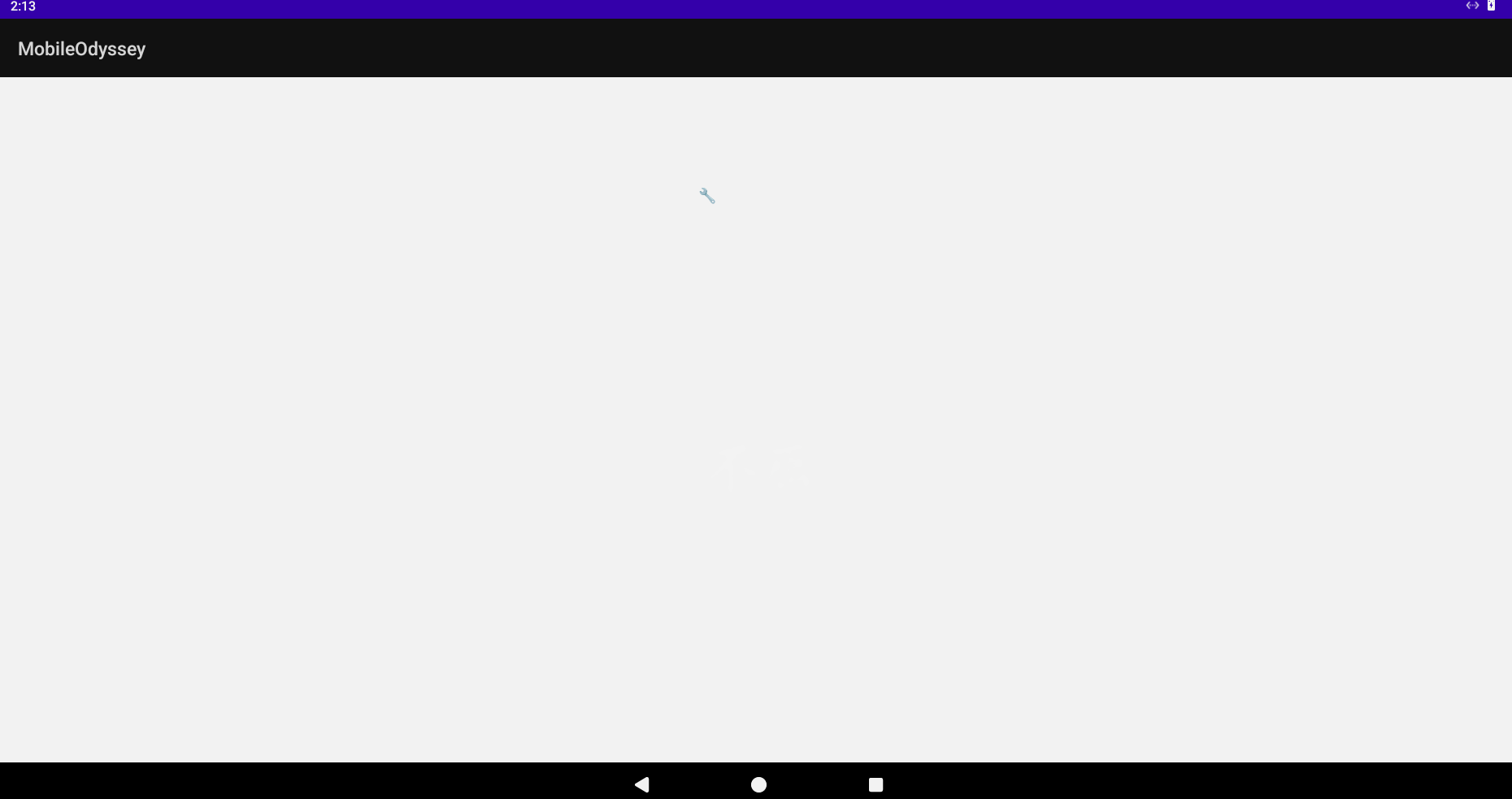
Tada! There’s nothing interesting here, just placeholder text. Now, we have to capture the remote configuration value dynamically.
The main idea is to hook the methods. I created a Frida script like this:
// Ai generatedJava.perform(function () { console.log("[*] Injection active. Waiting...");
var GameActivity = Java.use("com.jeannedhackctf.mobileodyssey.GameActivity"); var FirebaseRemoteConfig = Java.use("com.google.firebase.remoteconfig.FirebaseRemoteConfig");
// 1. We intercept the moment when the app tries to decode something // This is the "surgical" method try { GameActivity.tryDecodeBase64.implementation = function (value) { console.log("\n[!!!] BINGO! tryDecodeBase64 called!"); console.log(" Input (Base64): " + value);
var result = this.tryDecodeBase64(value); console.log(" Output (Flag): " + result); return result; }; } catch (e) { console.log("[-] Unable to hook tryDecodeBase64 (maybe the class is not loaded yet?)"); }
// 2. We intercept Firebase directly (Brute-Force method) // If the Activity crashes, Firebase might still work in the background FirebaseRemoteConfig.getString.overload('java.lang.String').implementation = function (key) { var value = this.getString(key); console.log("\n[+] Firebase.getString called for key: " + key); console.log(" Returned value: " + value); return value; };
// 3. MANUAL TRIGGER // We look for a live Activity instance in memory and force the fetch Java.choose("com.jeannedhackctf.mobileodyssey.GameActivity", { onMatch: function (instance) { console.log("\n[+] Found GameActivity instance in memory!"); console.log(" Attempting to force fetchRemoteConfig()..."); try { // Since fetchRemoteConfig is private, we should make it accessible or call it via reflection if it fails, // but Frida often bypasses privacy. We try calling tryDecodeBase64 directly if we have the string. // Or we call Firebase's public method ourselves:
var config = instance.remoteConfig.value; // Access to remoteConfig field (Kotlin property) if (config) { var secret = config.getString("sEcre7vALu3"); console.log(" [MANUAL TRIGGER] Value read directly: " + secret); } else { console.log(" [-] remoteConfig is null in the instance."); }
} catch (e) { console.log(" [-] Error in manual trigger: " + e.message); } }, onComplete: function () { console.log("[*] Memory scan completed."); } });
});BINGO!!!
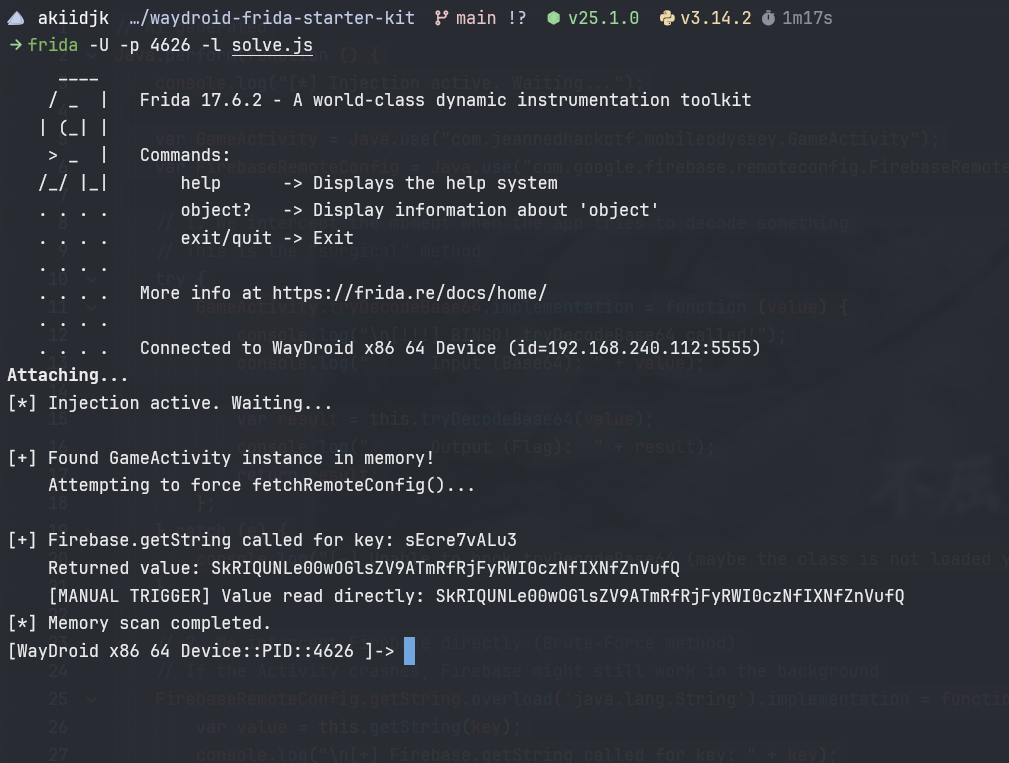
Post notes
Initially, I installed Frida incorrectly and couldn’t use the script, so I started looking through the application files in /data/data/com.jeannedhackctf.mobileodyssey/files/ and found the file frc_1:<number>:android: <id>_firebase_activate.json, which contained the encoded flag, but I still wanted to use Frida for the solve because it’s OBJECTIVELY cooler (this is possibile only when the application start correctly).
flag: